What Is Node.js and Why Did It Change Everything
For most of its early life, JavaScript lived in one place: the browser. If you wanted to build a website, you wrote JavaScript for the frontend and something else, maybe PHP or Java, for the backend. That was just how things worked. Then in 2009, a developer named Ryan Dahl released a small project called Node.js, and the line between frontend and backend code began to blur. Today, JavaScript is one of the most widely used languages for server-side development, and Node.js is the reason why.
This post is for anyone who has heard of Node.js but is not quite sure what it is, why it exists, or why so many developers chose it over the traditional tools they already knew.
JavaScript Was Born in the Browser
To understand Node.js, you have to understand where JavaScript came from. In 1995, Brendan Eich created JavaScript in about ten days for Netscape Navigator. The goal was simple: make web pages interactive. Click a button, validate a form, show a popup. That was it. JavaScript was never designed to be a general-purpose programming language. It was a scripting layer that lived inside the browser and had no access to the computer's file system, network, or hardware.
For years, this limitation was accepted without question. Browsers had a JavaScript engine that read your code, turned it into instructions, and ran it inside a sandboxed environment. The engine could not open files on your hard drive. It could not start a web server. It could not even read environment variables. It was a guest in the browser, and the browser kept it on a short leash.
This meant that if you wanted to build a full web application, you needed two separate worlds. The browser handled the user interface with JavaScript, and the server handled data, authentication, and business logic with something else entirely. PHP, Java, Python, Ruby. Pick your poison. JavaScript was not even in the conversation.
The Difference Between a Language and a Runtime
Here is a distinction that confuses a lot of beginners. JavaScript is a programming language. It is a set of rules and syntax for writing instructions. A runtime is the environment that actually executes those instructions. The language itself does not know how to print to a screen, read a file, or send a network request. The runtime provides those capabilities.
In the browser, the runtime is the browser itself. Chrome, Firefox, Safari. Each browser has its own JavaScript engine that implements the language. Chrome uses V8. Firefox uses SpiderMonkey. Safari uses JavaScriptCore. These engines understand the JavaScript language, but they also add browser-specific APIs like document.querySelector and window.alert. Those APIs are not part of JavaScript the language. They are part of the browser runtime.
Node.js is also a runtime. It takes the JavaScript language and gives it a completely different set of capabilities. Instead of document.querySelector, you get fs.readFile. Instead of window.setTimeout, you get process.env. The language is the same. The verbs are different.
Think of it like English. You can write a novel in English, and you can write a legal contract in English. The language is identical, but the context changes what you can say and do. Browser JavaScript and Node.js JavaScript are the same language operating in different contexts.
How Node.js Made JavaScript Run on Servers
Ryan Dahl's insight was straightforward. The V8 engine inside Chrome was fast, mature, and open source. What if you took that engine out of the browser, wrapped it in a runtime that could access the file system and network, and let developers write server applications in JavaScript?
That is exactly what Node.js is. It embeds the V8 engine, the same one Chrome uses, and adds a layer on top that provides server-side capabilities. File system access, network sockets, process management, and an event loop for handling asynchronous operations. The result is a standalone program that can execute JavaScript outside the browser.
Here is the simplest possible Node.js program:
const http = require('http');

const server = http.createServer((req, res) => {
  res.writeHead(200, { 'Content-Type': 'text/plain' });
  res.end('Hello from the server');
});

server.listen(3000, () => {
  console.log('Server running on port 3000');
});
This code creates a web server. It listens for HTTP requests and sends back a response. There is no browser involved. No HTML file. No script tag. Just a .js file executed by the node command in your terminal. That is the shift Node.js introduced. JavaScript was no longer confined to the browser. It could now live on the server, talk to databases, handle authentication, and serve APIs.
The V8 Engine: A High-Level Look
V8 is the JavaScript engine at the heart of Node.js. Google built it for Chrome, and it is written in C++. Its job is to take your JavaScript code and turn it into machine code that the computer's processor can execute directly.
Most programming languages use either an interpreter, which reads and executes code line by line, or a compiler, which translates the entire program into machine code ahead of time. V8 does something smarter. It uses just-in-time compilation, or JIT. It starts by interpreting your code quickly so it can run immediately. Then, as it notices which parts of your code run most often, it compiles those hot paths into highly optimized machine code. The result is a balance between fast startup and fast execution.
You do not need to understand the internals of V8 to use Node.js. What matters is that V8 is fast, actively maintained by Google, and constantly improving. Node.js benefits from those improvements automatically. When V8 gets faster, Node.js gets faster.
It is worth noting that Node.js does not use V8 in isolation. It wraps the engine in a larger runtime that adds capabilities V8 was never designed to provide. V8 handles the JavaScript language. Node.js handles the server environment.
Event-Driven Architecture
One of the defining characteristics of Node.js is its event-driven architecture. In traditional server environments, a request comes in, a thread is allocated, and that thread handles the request from start to finish. If the request needs to read a file or query a database, the thread waits. It does nothing useful until the operation completes.
Node.js takes a different approach. It uses a single thread to run your JavaScript and an event loop to manage asynchronous operations. When your code initiates a slow operation, like reading a file, Node.js delegates that work to the operating system or a background worker and immediately moves on. When the operation completes, an event is triggered, and a callback runs to handle the result.
This means the main thread is almost never idle. It is either executing JavaScript or waiting for the next event. It does not waste time blocking on I/O.
Here is a simple example that shows the event-driven pattern:
const fs = require('fs');

console.log('Starting...');

fs.readFile('data.txt', 'utf8', (err, data) => {
  if (err) {
    console.error('Failed to read file');
    return;
  }
  console.log('File contents:', data.substring(0, 50));
});

console.log('Waiting for file...');
The output will be:
Starting...
Waiting for file...
File contents: ...
The main thread does not pause at fs.readFile. It registers the callback, continues to the next line, and comes back to the callback only when the file system signals that the read is complete. This non-blocking behavior is the foundation of Node.js performance.
Node.js vs Traditional Backends
Before Node.js, the server-side landscape was dominated by languages like PHP, Java, and Ruby. Each had its own runtime model, and most relied on threads to handle concurrent requests.
PHP traditionally runs inside a web server like Apache. Each incoming request spawns a new process or uses a thread from a pool. The script executes from top to bottom, and if it needs to query a database, it waits. This model is simple and works well for many websites, but it does not scale efficiently under high concurrency because each waiting request consumes a process or thread.
Java uses a thread-per-request model in most of its popular web frameworks. Threads are more lightweight than processes, but they still consume memory and add scheduling overhead. A Java server handling ten thousand concurrent connections needs ten thousand threads, each with its own stack. The memory cost adds up quickly.
Node.js handles concurrency differently. It uses one main thread and an event loop. Slow operations are delegated to the operating system or background workers, and the main thread never blocks. This means a single Node.js process can maintain tens of thousands of concurrent connections with a fraction of the memory that a threaded server would require.
The trade-off is that Node.js is not ideal for CPU-intensive work. A long calculation on the main thread blocks the event loop and freezes the server for everyone. Java, with its multi-threading model, can spread CPU work across many cores more naturally. PHP, with its process-per-request isolation, avoids this problem entirely because one slow request does not affect others.
So the choice is not about which runtime is better in absolute terms. It is about which runtime fits your workload. Node.js excels at I/O-bound applications where the server spends most of its time waiting for networks and databases. For CPU-bound workloads, other options may be more appropriate.
Why Developers Adopted Node.js
Node.js did not become popular because it was marginally faster than the alternatives. It became popular because it solved real problems that developers were facing.
One language across the stack. Before Node.js, a web team needed frontend developers who knew JavaScript and backend developers who knew PHP, Java, or Python. Context switching was constant. Debugging across language boundaries was painful. Node.js let teams use one language everywhere. A developer who understood closures and promises in the browser could apply the same knowledge on the server.
JSON everywhere. JavaScript Object Notation became the default data format for APIs. In a Node.js application, you parse JSON natively. No external libraries, no type conversions, no impedance mismatch between the data format and the language. The frontend sends JSON, the backend consumes JSON, and the database often stores JSON. Everything fits together.
NPM and the ecosystem. Node.js shipped with NPM, a package manager that made sharing and reusing code trivial. Within a few years, NPM became the largest package registry in the world. Need to hash a password? There is a package for that. Need to validate an email address? There is a package for that. The ecosystem reduced the amount of code developers had to write from scratch.
Fast feedback loops. Node.js starts instantly. You save a file, restart the process, and see results in under a second. Compare that to Java, where compilation and deployment can take minutes. For iterative development, this speed matters.
Real-time by default. The event-driven model made building real-time applications feel natural. WebSockets, server-sent events, and streaming responses fit the architecture without fighting against it. Frameworks like Socket.io emerged quickly and made real-time features accessible to any developer.
Real-World Use Cases
Node.js is not a theoretical exercise. It powers production systems at companies you use every day.
Netflix uses Node.js for its server-side rendering and user interface layers. They needed a lightweight, fast-starting runtime that could handle massive scale, and Node.js fit the bill.
LinkedIn rebuilt their mobile server stack with Node.js and cut their server count dramatically while improving response times. Their mobile API is a perfect example of an I/O-bound workload where Node.js shines.
PayPal migrated parts of their platform to Node.js and reported faster development cycles and reduced infrastructure costs. Their checkout flow, one of the most critical paths in e-commerce, runs on Node.js.
Uber uses Node.js for their dispatch system, which matches drivers with riders in real time. The system handles a constant stream of location updates and matching events with low latency.
NASA uses Node.js for mission-critical systems. After a near-disaster in 2013, they moved to a microservices architecture built on Node.js to improve data accessibility and reduce the risk of system failures.
These organizations did not adopt Node.js because it was trendy. They adopted it because it solved specific problems: handling many concurrent connections, reducing memory footprint, enabling real-time features, and letting JavaScript developers work across the entire stack.
Diagram: Browser JavaScript vs Node.js Execution
This diagram shows how the same JavaScript code runs in two completely different environments:
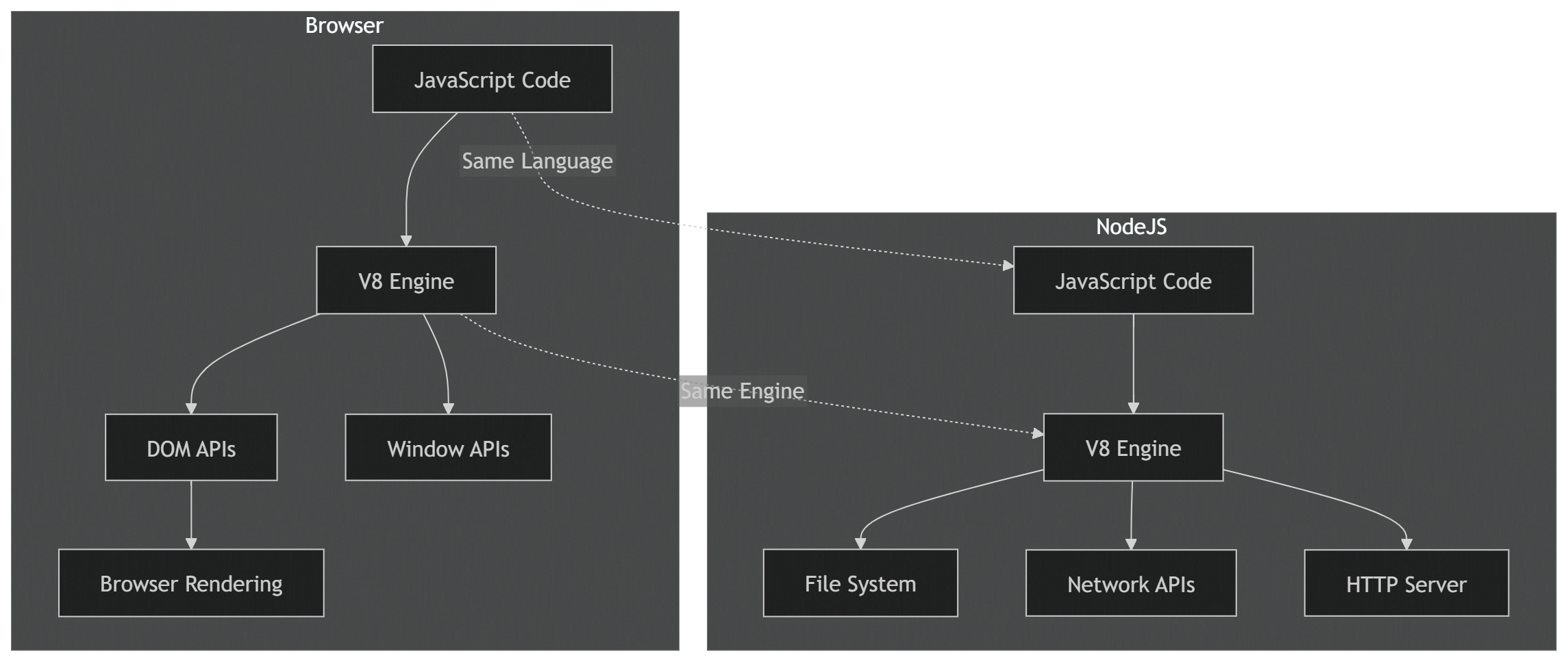
The language and the engine are the same. The capabilities are entirely different. The browser gives you access to the page. Node.js gives you access to the server.
Diagram: Node.js Runtime Architecture Overview
This diagram shows the major components of the Node.js runtime and how they interact:
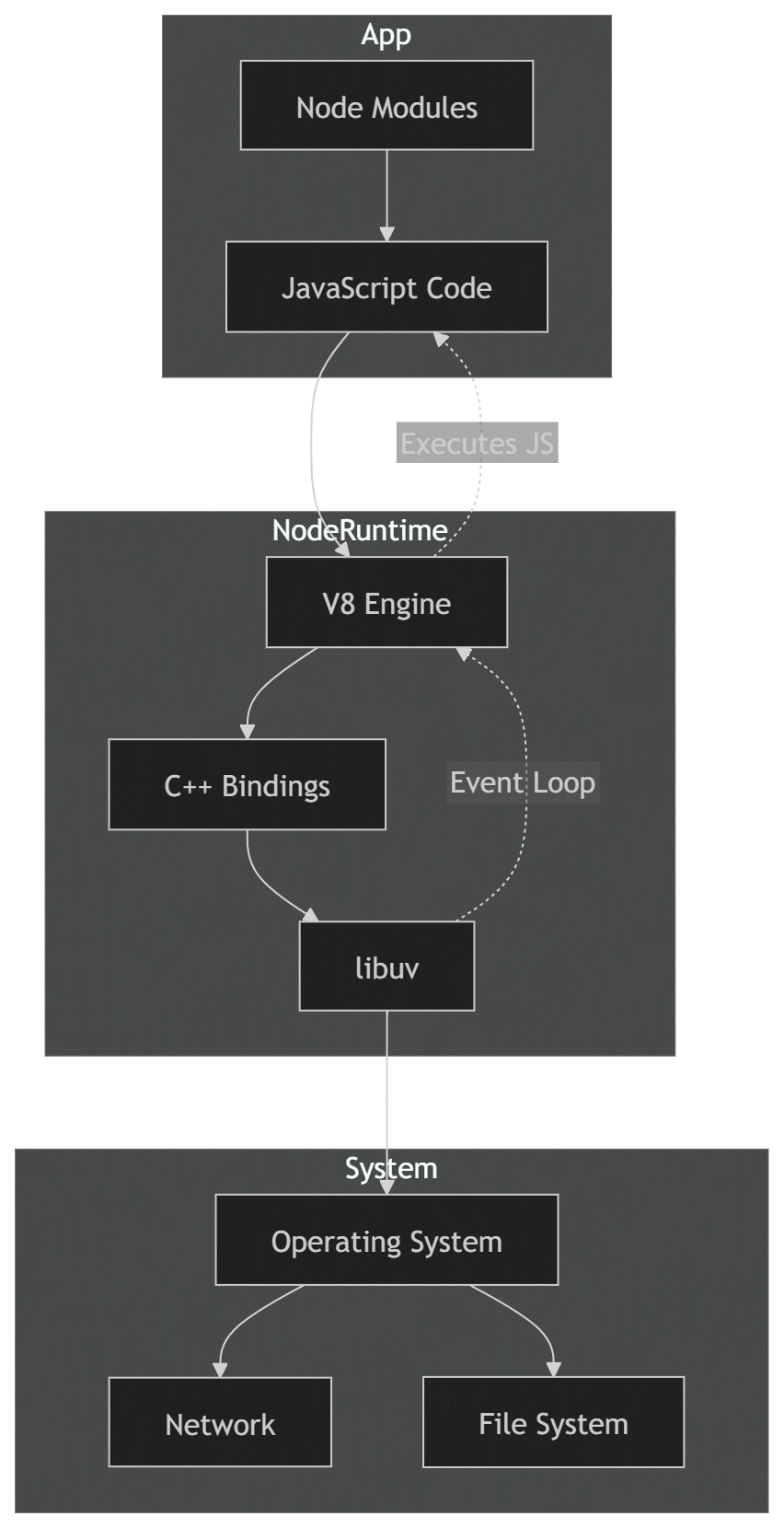
Your JavaScript code runs through the V8 engine. When you call a server-side API like fs.readFile, V8 hands the request to C++ bindings, which pass it to libuv. Libuv either uses the operating system's async I/O or its own thread pool, and signals V8 when the result is ready.
Wrapping Up
Node.js is not just a way to run JavaScript on a server. It is a rethinking of what JavaScript can be. It took a language that was designed for buttons and forms and gave it the power to handle databases, networks, and millions of concurrent users.
The key insight is that Node.js is a runtime, not a language. It uses the same JavaScript you write in the browser but gives it a completely new set of capabilities. It pairs that language with an event-driven, non-blocking architecture that makes efficient use of a single thread. And it wraps everything in an ecosystem that made sharing code so easy that JavaScript became the most popular language in the world.
If you are new to Node.js, the best way to understand it is to stop thinking about JavaScript as a browser language and start thinking about it as a general-purpose tool. The language did not change. The context did. And that change opened doors that developers are still walking through today.