What Is the Node.js Event Loop and Why Does It Matter
If you have written even a little bit of JavaScript, you have probably used setTimeout or fetched data from an API. You wrote the code, it ran, and somehow everything happened in the right order even though your program never stopped to wait. Behind that smooth experience is a mechanism called the event loop, and understanding it is the difference between writing Node.js code that works and writing Node.js code that performs.
In this post, we will look at what the event loop actually is, why Node.js depends on it, and how it manages the chaos of asynchronous operations without ever needing more than one thread.
The Single-Threaded Problem
Node.js runs your JavaScript on a single thread. That means one call stack, one execution context, and one sequence of operations happening at any given moment. If you come from a language like Java or C#, where every incoming request gets its own thread, this can feel like a handicap. How can one thread possibly handle a web server that needs to serve hundreds of users at the same time?
The answer is that Node.js does not try to do everything at once. Instead, it tries to never wait. When your code encounters something slow, like reading a file or querying a database, Node.js does not pause and stare at the clock. It parks that task, moves on to the next thing, and comes back when the result is ready. The event loop is the traffic manager that makes this possible.
Think of it like a barista working alone at a coffee shop. There is only one person behind the counter, but they are not going to stand still while the espresso machine brews. They take your order, start the shot, and while it extracts they turn to the next customer. The espresso finishes in the background. The barista never makes two drinks simultaneously, but they never stand idle either. That is the single-threaded model in action.
What the Event Loop Actually Is
The event loop is not a separate thread. It is not a library you import. It is a loop that lives inside the Node.js process, constantly checking whether there is any JavaScript code ready to run. Its job is simple: look at the call stack, look at the waiting tasks, and push the next available callback onto the stack when the time is right.
You can think of the event loop as a task manager. You hand it a list of jobs. Some jobs are quick and can be done right now. Others need to wait for a timer, a file, or a network response. The task manager keeps a running list, and whenever the current job finishes, it checks the list and picks the next one that is ready.
Without the event loop, asynchronous code would be impossible in a single-threaded environment. Every time you opened a file, your entire program would freeze until the hard drive responded. The event loop is what allows Node.js to say, "I will get back to you," and actually mean it.
The Call Stack and the Task Queue
To understand how the event loop works, you need to know about two places where code lives: the call stack and the task queue.
The call stack is where your JavaScript runs. It is a last-in-first-out structure. When a function is called, it gets pushed onto the stack. When it finishes, it gets popped off. The function currently on top of the stack is the one actively executing. Because there is only one thread, there is only one call stack, and only one function can be on top at any moment.
The task queue is where callbacks wait their turn. When you call setTimeout or register a file read, the actual work happens outside the call stack. When that work finishes, the callback does not jump straight into execution. It joins the task queue and waits for the call stack to clear.
Here is the critical rule: the event loop will only push a task from the queue into the call stack when the call stack is completely empty. It never interrupts a running function. This is why the following code behaves the way it does:
console.log('First');

setTimeout(() => {
  console.log('Second');
}, 0);

console.log('Third');
Even though the timeout is set to zero milliseconds, the output is:
First
Third
Second
The setTimeout callback goes into the task queue immediately, but the call stack still has console.log('Third') to finish. The event loop will not touch the queue until the stack is empty. Only then does "Second" get a chance to run.
How Async Operations Are Handled
When you write asynchronous code in Node.js, you are really doing two things. First, you are asking the runtime to perform some work outside the call stack. Second, you are giving it a callback to run when that work is done. The event loop is the bridge between those two moments.
Consider reading a file:
const fs = require('fs');

console.log('Starting read...');

fs.readFile('data.txt', 'utf8', (err, data) => {
  console.log('File contents ready');
});

console.log('Doing other work...');
Here is what happens step by step:
console.log('Starting read...')enters the call stack, executes, and leaves.fs.readFileenters the call stack. It hands the actual file reading to the operating system or a background worker, registers the callback, and immediately returns.console.log('Doing other work...')enters the call stack, executes, and leaves.The call stack is now empty. The event loop checks the task queue.
At some point, the file system finishes reading. The callback is placed in the task queue.
The event loop sees the callback, pushes it onto the call stack, and
console.log('File contents ready')executes.
The key insight is that the file reading did not happen on the call stack. It happened elsewhere, and the event loop was notified when it was time to bring the result back into JavaScript land.
Promises and async/await follow the same principle, though they use a specialized queue called the microtask queue. Microtasks have higher priority than regular tasks, which is why promise callbacks tend to run before setTimeout callbacks. But the fundamental idea is identical: defer work, wait for completion, schedule the callback, let the event loop handle the rest.
console.log('A');

setTimeout(() => console.log('B'), 0);

Promise.resolve().then(() => console.log('C'));

console.log('D');
The output is A, D, C, B. The promise microtask jumps ahead of the timer task because of queue priority, but both still depend on the event loop to move from queue to stack.
Timers vs I/O Callbacks
Not all asynchronous work is the same. At a high level, Node.js deals with two major categories: timers and I/O callbacks.
Timers include setTimeout, setInterval, and setImmediate. These are time-based. You ask the runtime to run a function after a certain delay or at a certain interval. The event loop keeps track of when these timers expire and moves their callbacks into the task queue at the appropriate moment.
I/O callbacks come from operations like file system reads, network requests, and database queries. These are not time-based. They are completion-based. The callback enters the queue whenever the underlying operation finishes, which could be in a millisecond or in thirty seconds.
The event loop treats these differently. Timers are checked on a schedule. I/O callbacks are checked when the operating system reports that data is ready. This separation is part of what makes Node.js efficient. It does not waste cycles polling a timer that still has four seconds left. It waits for the OS to wake it up when something interesting happens.
Here is a small example that shows both in action:
const fs = require('fs');

setTimeout(() => {
  console.log('Timer fired');
}, 100);

fs.readFile(__filename, () => {
  console.log('File read complete');
});

setImmediate(() => {
  console.log('Immediate callback');
});
The exact order can vary slightly depending on system load, but you will typically see the file read and the immediate callback before the timer, because the timer still has one hundred milliseconds to wait. The event loop is constantly making these scheduling decisions based on what is ready right now.
The Event Loop and Scalability
The reason the event loop matters for scalability is that it keeps the main thread free. In a traditional threaded server, each request consumes a thread for its entire lifetime. If a request spends most of its time waiting for a database, that thread is sitting idle, burning memory and adding overhead to the operating system scheduler.
In Node.js, the main thread only works when there is actual JavaScript to execute. The waiting happens elsewhere. One thread can juggle thousands of concurrent requests because it is never stuck waiting for I/O. It delegates, moves on, and picks up results as they arrive.
This is why Node.js excels at real-time applications, API gateways, and streaming services. These are I/O-bound workloads where the event loop's non-blocking model shines. The thread is always doing useful work, and the memory footprint stays low because you are not maintaining a separate stack for every open connection.
Of course, this model has limits. If your JavaScript itself is slow, if you perform heavy computation or use synchronous I/O methods, you block the event loop and freeze everything. Scalability depends on respecting the contract: keep the main thread lean, delegate the waiting, and let the event loop schedule the callbacks.
Diagram: Call Stack, Task Queue, and Event Loop Flow
Here is a visual model of how these pieces fit together:
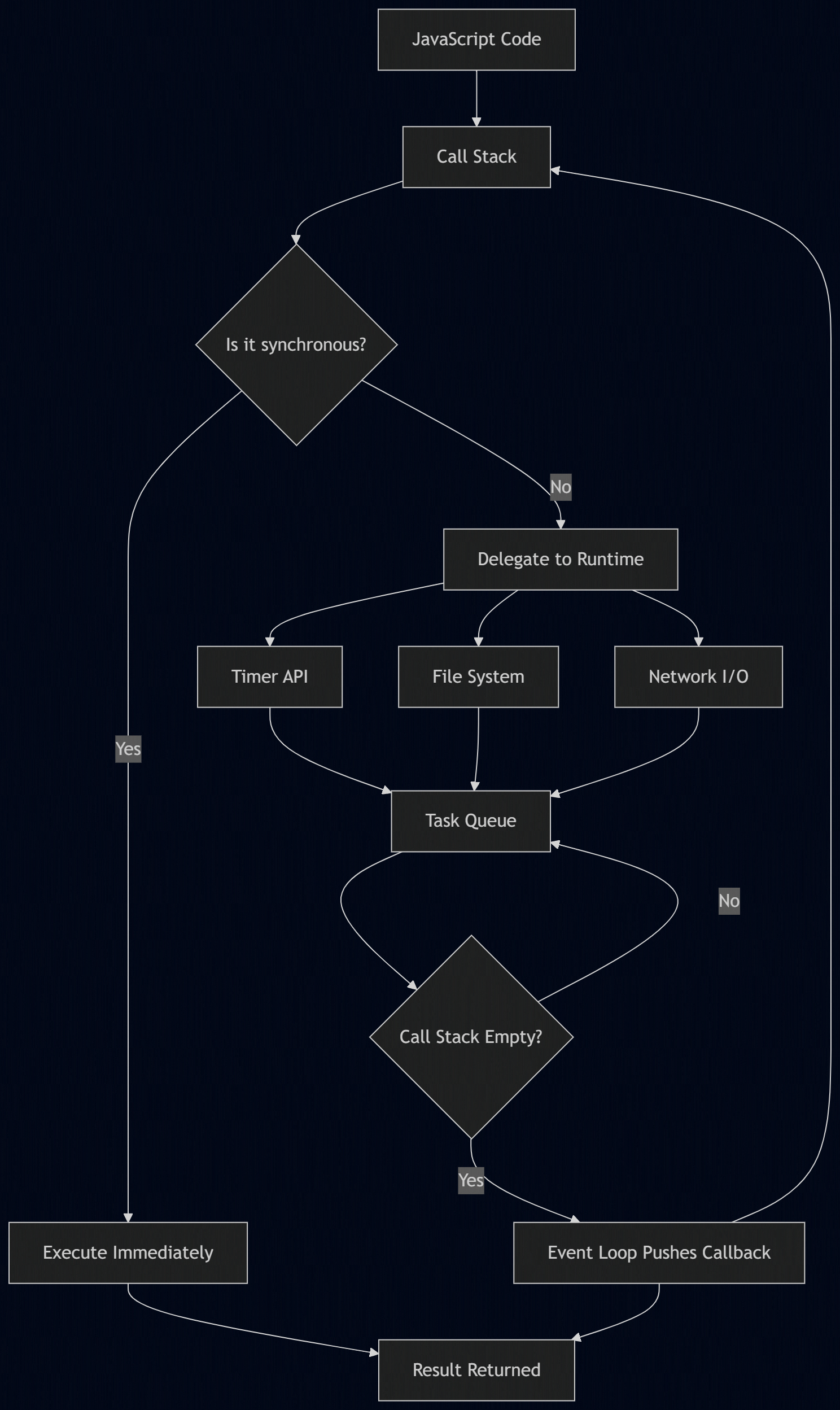
The blue box is where your code runs. The yellow box is where callbacks wait. The purple diamond is the event loop's decision point. Nothing moves from the queue to the stack until the stack is clear.
Diagram: Event Loop Execution Cycle
This diagram shows a single cycle of the event loop in action:
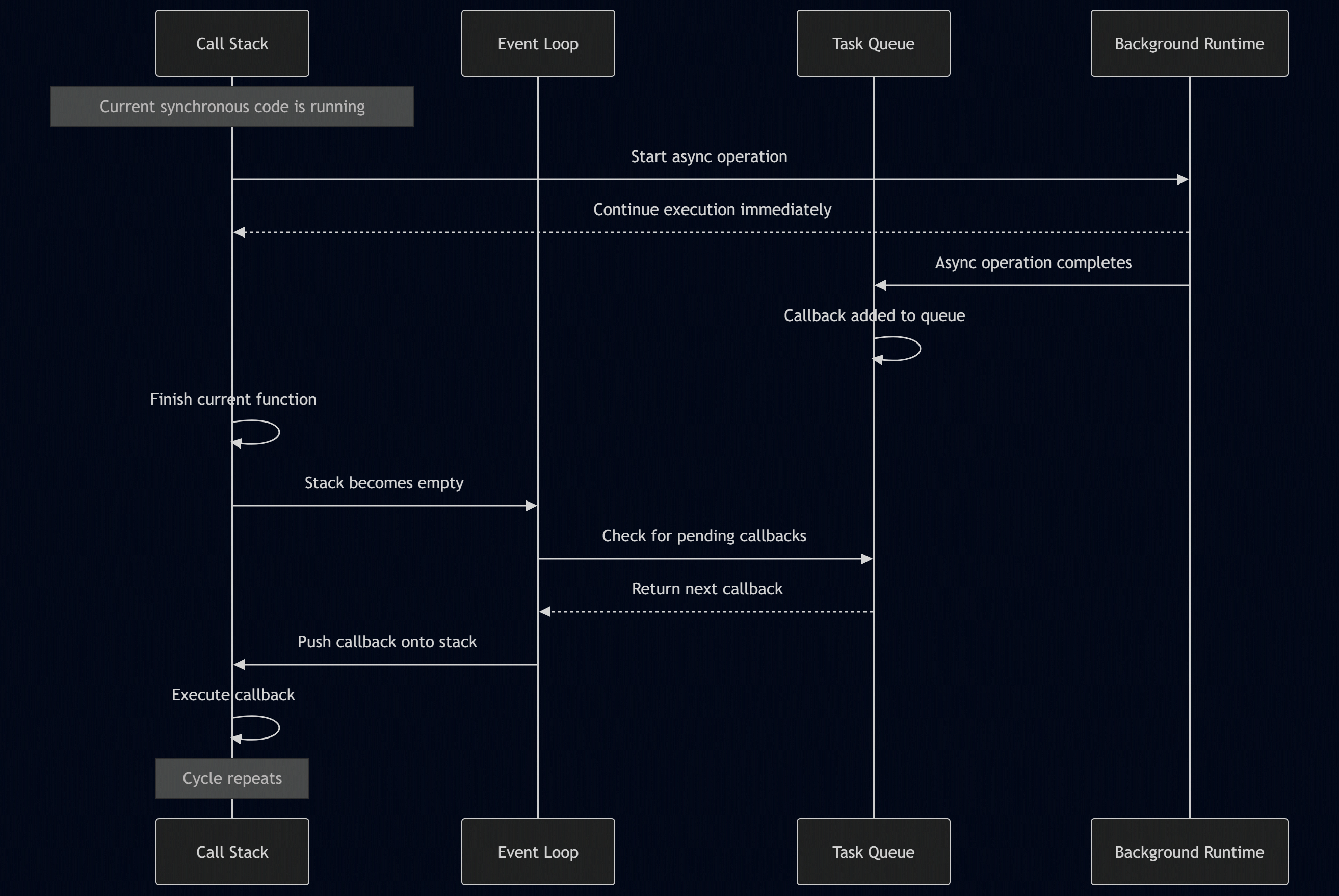
The event loop does not run continuously in the background like a separate engine. It runs when the call stack empties. It looks at the queue, picks the next task, and the cycle begins again.
A Practical Example
Let us walk through a slightly more realistic example to see the event loop managing multiple operations at once:
const fs = require('fs');

function processRequest(id) {
  console.log(`[${id}] Request started`);

  setTimeout(() => {
    console.log(`[${id}] Timer done`);
  }, 100);

  fs.readFile(__filename, 'utf8', (err, data) => {
    console.log(`[\({id}] File read: \){data.length} bytes`);
  });

  console.log(`[${id}] Handler finished`);
}

processRequest(1);
processRequest(2);
When you run this, you will see both "Request started" and "Handler finished" messages print immediately. The timers and file reads are in flight. Then, as the background work completes, the callbacks enter the queue and the event loop schedules them. The file reads might finish before the timers, or after, depending on your system. The event loop does not care about the order in which you wrote the code. It cares about the order in which tasks become ready.
This is the mental model you need. Your code defines what should happen. The event loop decides when it happens.
Wrapping Up
The event loop is not an advanced topic reserved for framework authors. It is the foundation of every Node.js program you will ever write. When you understand that your code runs on a single thread, that async operations are delegated and callbacks are queued, and that the event loop is the simple but relentless mechanism moving tasks from queue to stack, you stop guessing why your code behaves the way it does.
You start writing with the event loop in mind. You avoid synchronous I/O in request handlers. You keep your callbacks lean. You respect the fact that one slow calculation blocks everyone. And you take advantage of the fact that one well-managed thread can outperform a hundred poorly managed ones.
Node.js is not fast because it uses a clever engine. It is fast because it refuses to wait. The event loop is what makes that refusal possible.